Skip to content
BatchCast
EN / DE
For podcast & broadcast production

Batch Audio Workflow Editor

Render hundreds of broadcast-ready audio variants from one template in seconds.

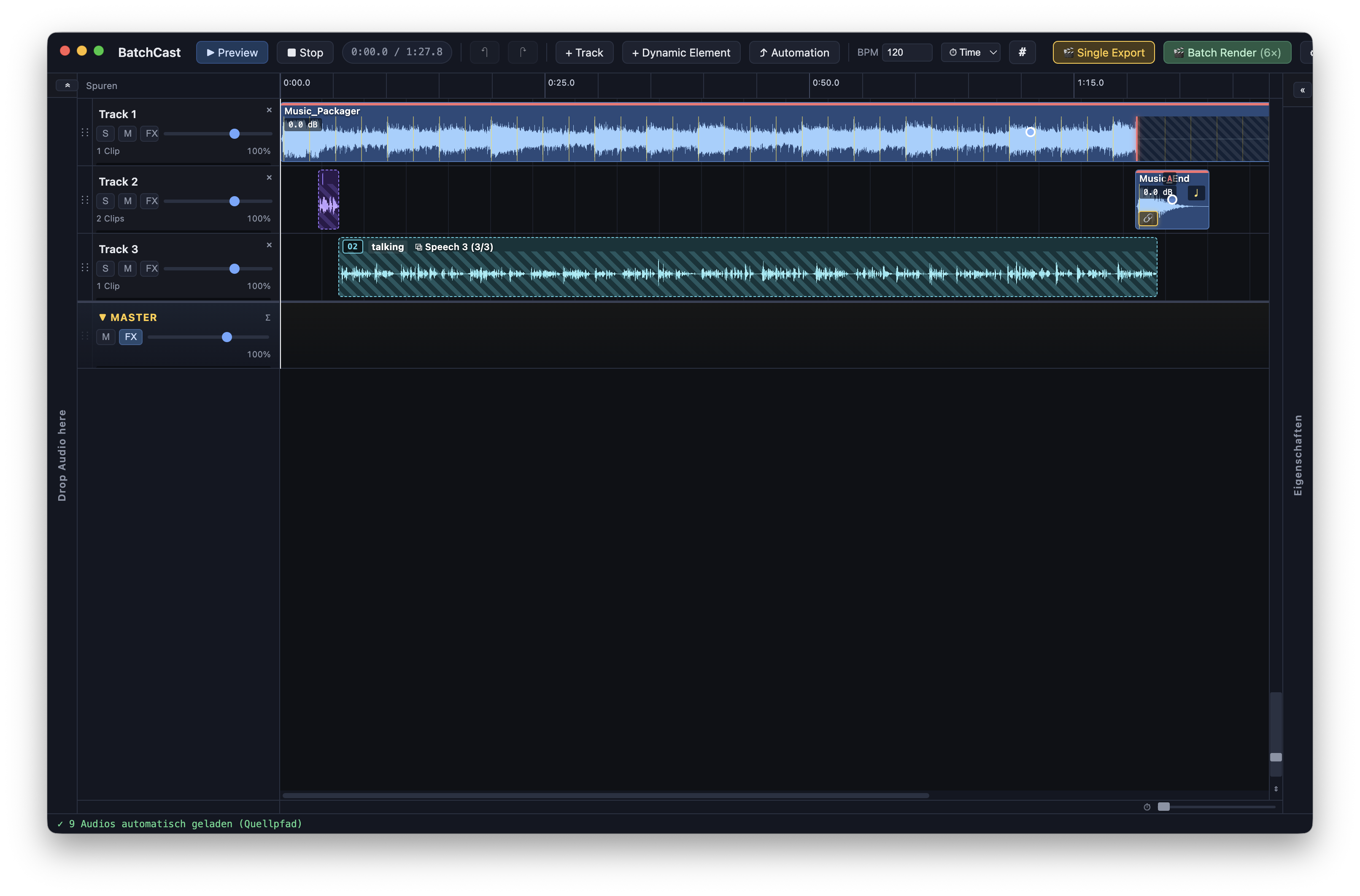
BatchCast is the desktop app for multi-track audio with dynamic placeholders. Multi-host × content × sponsor — every possible combination, rendered automatically.

macOS · Windows

Why BatchCast exists

Anyone producing weekly podcast or broadcast content knows the pattern: your time belongs in the concept, the writing, the edit — not in the export workflow.

1

Weekly production is repetitive.

Same beds, same intros, only the voiceover and content change. Yet most studios still rebuild every episode by hand.

2

Manual exports are error-prone.

Wrong file on the wrong lane, a forgotten variant, an untrimmed bed. At 50 renders per week, a single mistake gets expensive.

3

Good tools are missing.

Classic DAWs are built for mix & master — not for template-based multi-variant audio. BatchCast closes that gap.

What BatchCast is used for

Weekly podcast

Intro + bed + outro are fixed. Per episode you only drop the voiceover — BatchCast builds the finished show. With LoopCut the bed ends precisely on the right beat, every time.

Saves arranging and render time on every episode

Multi-host trailer

Two hosts × three content variants = 6 outputs. Hosts are coupled in one group (intro+outro from the same voice), content rotates in a second group.

Consistent — no forgotten combinations

Modular radio content

Station jingles, prepared moderation slots, promotion drops. Build templates and work with CLI command-line automation to have the right variants ready at the right time.

All from the command line, ready whenever you want

What makes BatchCast different

Six core features you won’t find combined in any DAW.

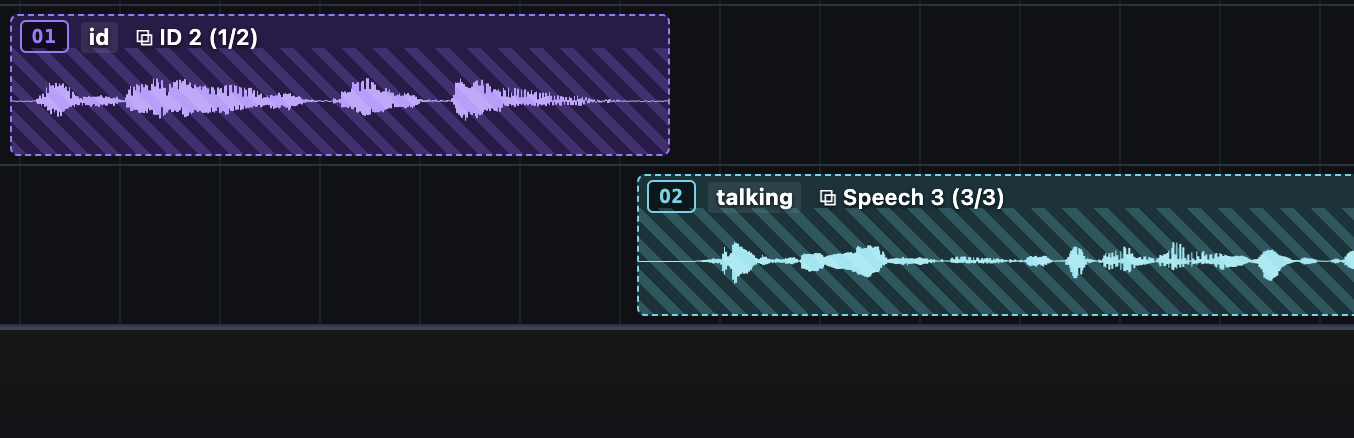
Two dynamic clips with multiple variants on two tracks

Dynamic elements

Place dynamic placeholder clips. Each holds N audio variants. On render, every combination becomes a finished WAV.

*Multiple dynamic elements require BatchCast Pro.
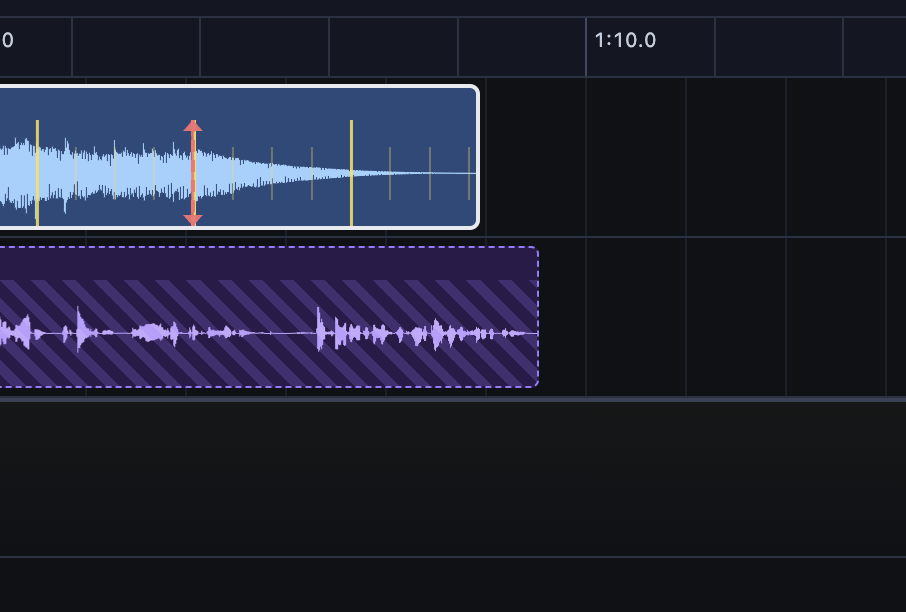
LoopCut editor with BPM detection + beat-aligned trim marker

Beat-aware LoopCut

The BPM analyzer tries to detect the tempo, and the music is trimmed to the length of the dynamic element. Sounds human, not edited.
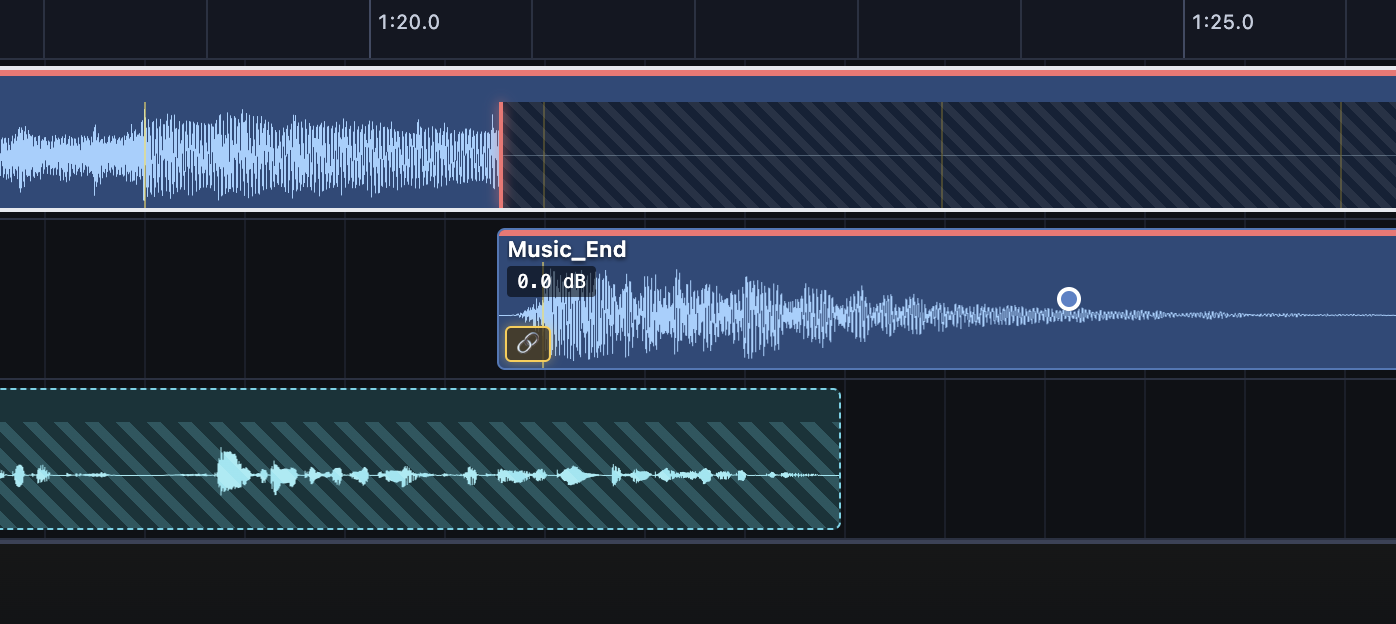
Two clips in the same mute group — the later element ends the previous one

Mute groups

Audio elements can be assigned to mute groups. Within the same group, a later element ends the previous one — e.g. to place an outro element.

CLI batch mode

Headless rendering from the command line. Watch folders, cron jobs, nightly builds. The project is the template; audio is fed in via the input folder.

*CLI batch mode requires BatchCast Pro.
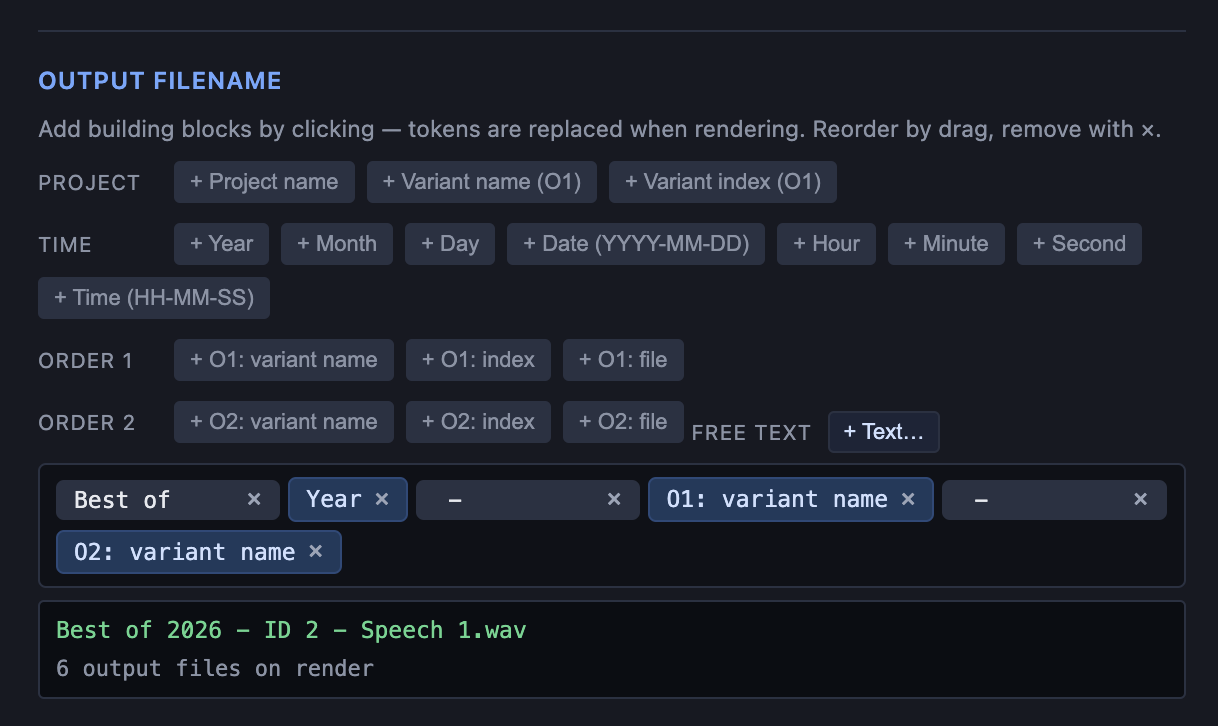
Output name builder with token groups and live filename preview

Flexible file naming

A token-based name builder: project name, variant index, date, group names. Hundreds of renders get clean, unique filenames automatically — no manual renaming.
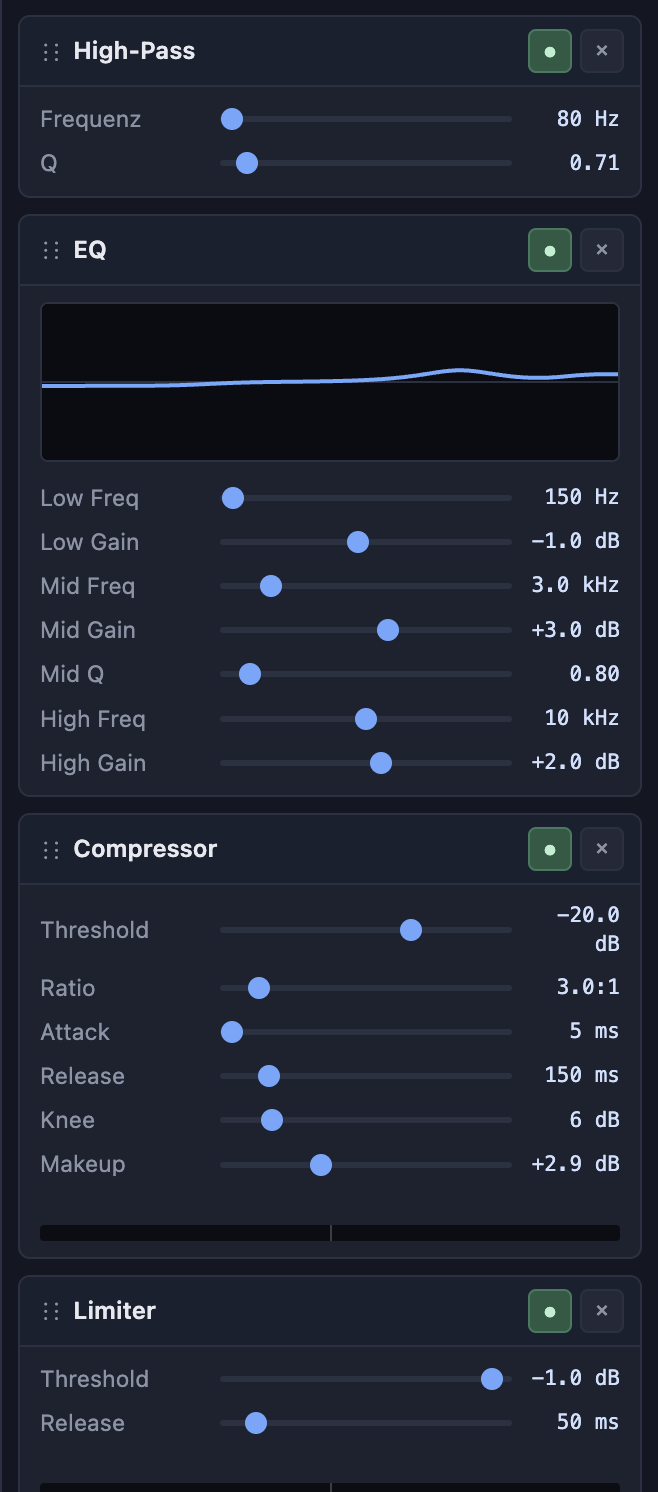
FX chain panel with HP/LP/EQ/Comp/Limiter and gain reduction meter

Per-track FX + master

High-pass, low-pass, 3-band EQ, compressor, limiter — per track. Plus master limiter and voice presets that just work.

Real-world examples

Where BatchCast and BatchCast Pro make the difference in daily work.

BatchCast

Daily show: intro bed, episode & a clean ending

A music bed with intro runs under the episode — and thanks to LoopCut it ends exactly on the music bed’s end, not hard-cut or faded out. Per episode you just drop the finished content into the dynamic element.

Need a fixed outro instead? Chain an end element to the end of the episode — it stays linked automatically, no matter how long the episode runs.

Step by step in BatchCast
  1. 1 Drag the intro/music onto the first track and create a dynamic element on track 2.
  2. 2 Drag all episodes onto the dynamic element on track 2.
  3. 3 Right-click the intro/music. Under “Beats & Snap”, enable LoopCut.
  4. 4 Check LoopCut; adjust the markers and BPM if needed.
  5. 5 Click “GO – Render” to export all episodes.

5 episodes → 5 finished WAVs in under a minute.

⭐ BatchCast Pro

Radio imaging: jingles · vocals × moderation

An imaging bed for your morning show, two variant groups you can combine freely — BatchCast Pro renders every combination automatically.

Step by step in BatchCast Pro
  1. 1 Drag the imaging/jingle onto track 1, switch the timeline to BPM and set the project BPM.
  2. 2 Create a dynamic element on track 2, placed at the beat-correct entry point of the vocal. Drag all vocal variants onto the dynamic element.
  3. 3 Add another track, create a second dynamic element and place it right after dynamic element 1. Right-click the element and switch it to order 2.
  4. 4 Link the second dynamic element to the end of the first one via its properties. This keeps the second element’s relative position constant — it shifts dynamically when the first element has different lengths.
  5. 5 Fill the second dynamic element with audio and click “GO – Render” to export all variants.

2 × 2 = 4 finished imaging variants — rendered automatically.

⭐ BatchCast Pro · CLI

Modular content: build the template once, then just fill it

With BatchCast Pro you build the template once that reliably produces modular content. After that, your automation only fills the subfolders with the fresh audio — a cron job kicks off the run, and the finished content is ready. No opening the app, no clicking.

Step by step in BatchCast Pro
  1. 1 Design the template in the BatchCast GUI and set the identifiers of the dynamic elements — e.g. “sing” or “dailycontent”.
  2. 2 Consolidate the project via the menu and move it, with all audio, to a new location.
  3. 3 Fill the element folders daily or weekly with the new audio and process them via the batch command line.
Tip: When consolidating, BatchCast creates an HTML help file that already contains the matching command-line commands for Windows and Mac.

Set it up once, and production runs fully automatically — day after day.

Pricing & demo

One-time purchase, yours to keep. 12 months of updates included — after that the app keeps running. New updates later via an optional renewal. Prices in EUR, net. EU consumers: local VAT added at checkout (Lemon Squeezy is Merchant of Record).

Want to try it first? 7-day full version, no registration.

To test the full feature set, the trial can be switched between BatchCast and BatchCast Pro.

Download trial →

BatchCast

For one show, one strand of variants.

€99 one-time
  • Multi-track editor with trim, fades, preview
  • FX chain per track + master limiter
  • Beat-snap, LoopCut, ducking
  • Drag-and-drop import from Finder / Explorer
  • 1 dynamic element
  • Batch render those variants (GUI)
  • 12 months of updates included
Buy BatchCast
⭐ Recommended

BatchCast Pro

Scale and automation. Many variants, freely combined, CLI.

€299 one-time
  • Everything in BatchCast
  • Unlimited dynamic elements
  • Multiple variant groups — every combination, automatic
  • CLI / headless render for cron & watch folders
  • Project consolidation (CLI prep)
  • 12 months of updates included
Buy BatchCast Pro

Pro bundles for studios & teams

Multiple machines in one purchase — cheaper per seat.

Pro · 3 machines

€749 one-time

Instead of €897 bought individually

3 seats – €749

Pro · 5 machines

€1,149 one-time

Instead of €1,495 bought individually

5 seats – €1,149

Enterprise

on request

More than 5 seats, site license, or custom requirements? We tailor a quote.

Get in touch

* One-time activation requires an internet connection. After that BatchCast works offline. A license is tied to one machine but can be moved to another.

Feature comparison

Which edition fits your workflow?

Feature BatchCast BatchCast Pro
Multi-track editor, trim, fades, preview
FX chain per track, master + limiter
Beat-snap / LoopCut / ducking
Single export (current state)
Drag-and-drop import (Finder / Explorer)
Dynamic elements 1 unlimited
Combine multiple variant groups
CLI / headless automation
Project consolidation (CLI prep)
Updates included 12 months 12 months
Platforms macOS + Windows macOS + Windows

Frequently asked questions

Which systems are supported?
macOS 10.12 (Sierra) or newer — Apple Silicon and Intel. Windows 10/11 (64-bit).
Subscription or purchase?
Purchase. BatchCast is a classic one-time buy — no subscription, no monthly fees. You pay once and use the app forever. 12 months of updates are included; after that the installed version keeps running indefinitely. Future updates require an optional renewal.
What happens after 12 months?
Nothing bad. Your version keeps running unchanged — open projects, render, everything stays functional. Only new features and bug fixes require an update renewal (€49/year for BatchCast, €149/year for Pro). Renewing is optional.
Renewal or upgrade — how?
Click "Renew updates" or "Upgrade to Pro", enter your license key (shown in the app under Settings → License and in your purchase email) and complete the payment. The app applies the change automatically at the next launch.
On how many computers?
BatchCast and BatchCast Pro: 1 computer (transferable — deactivate in the app, activate on the new machine). Pro bundles: 3 or 5 computers respectively.
Internet connection required?
Only once, for activation. After that BatchCast runs offline.
What about GDPR?
BatchCast stores no personal data on your machine besides the license info required for activation. There is no telemetry. Purchases run through Lemon Squeezy (Merchant of Record) in the USA, with an EU data-processing agreement.
Refund / trial?
7 days of full functionality, no registration — downloadable as a time-limited full version. Test the workflow on your real projects before buying. After activation, the statutory right of withdrawal for digital content is limited, so we recommend trialling first.
Do I get an invoice?
Yes. Lemon Squeezy issues an invoice automatically after purchase, with correct VAT handling for your country of residence.

Download & trial

7 days of full functionality, no registration. If BatchCast fits your workflow, buy a license later — projects and settings stay intact.

macOS

Apple Silicon (arm64) and Intel. Requires macOS 10.12 (Sierra) or newer.

Windows

Windows 10/11 (64-bit).

Just write to us

Did we miss something? A feature that absolutely should be part of BatchCast? Or is there a problem you’d like us to look into? We read every message ourselves — no ticket system, no hold music.

info@batchcast.de